By Miles Sinclair
Updated November 2026
The best light show for Christmas is the one that fits your house, your budget of time and gear, and the music you want to sync it to. This guide walks you through how to judge the options, plan a layout, and get a synced display running without a lot of guesswork. By the end, you will know which type of show suits your space and what to set up first.
What Makes a Light Show Worth Doing
A good holiday light show does three things well. It looks clean from the street, it stays in sync with the audio, and it can be maintained over a few weeks without constant troubleshooting. Many people focus only on the lights themselves, but the controller, power distribution and audio source matter just as much. Start by deciding which of those matters most to you before you buy anything.
If you are new to synced displays, it helps to read a broader overview first. The guide to Whole House Christmas Light Show: A Step-by-Step Guide for 2026 covers how a full-property layout comes together, which is useful even if you only plan to light one section.
Step 1: Choose Your Show Format
There are four common formats, and each suits a different property:
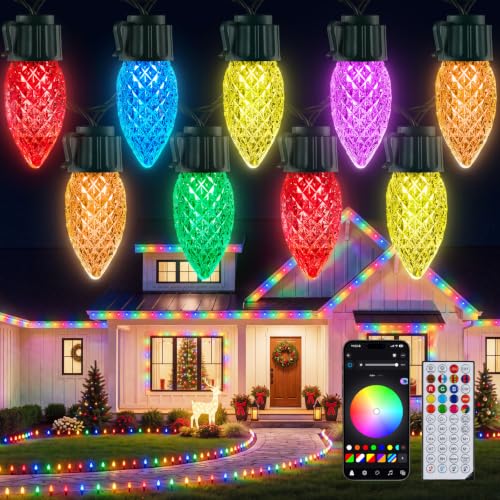
- Pixel-based light strings with a dedicated controller, best for front-yard trees, roofline and eaves where you want motion and color chasing.
- Projectors, best for large blank walls or garage doors where you want a lot of visual impact with minimal physical installation.
- Laser shows, best for open driveways or lawns where the beams can reach a clear background such as trees or fog.
- Hybrid setups that combine pixel strings with a projector or laser, which give the most variety but require more planning.
For a closer look at laser-based options, see Laser Light Show Christmas: 3 Best Picks for Your Home (2026). If a projector sounds like the right fit, Christmas Holiday Light Show: 3 Best Projectors for Synced Holiday Displays compares the main types.
Step 2: Measure and Map Your Space
Before buying lights, measure the areas you plan to cover. Record the following:
- Width and height of each target surface, in feet.
- Distance from the projector or laser position to the target, which determines throw and beam reach.
- The nearest outdoor power outlets and their circuit amperage (typically 15 or 20 amps in North American homes).
- Any obstructions such as gutters, shrubs or trees that will block light or get in the way of cables.
Pixel strings are usually counted in pixels per foot and total length per run. Keep each run within the length the manufacturer specifies for that controller output. Exceeding it often causes dim or flickering sections near the end of the run.
Step 3: Plan Power and Controllers
Power is where most first-time setups run into trouble. Work out the total wattage of everything that will run at once, including the controller, projector and any pumps or inflatables on the same circuit. A common rule of thumb is to keep continuous load at or below 80 percent of the circuit rating. Use outdoor-rated extension cords and weatherproof connections, and avoid daisy-chaining power strips.
The controller decides how sequences are sent to your lights. Some controllers play pre-programmed shows with an audio input, while others use software to build sequences from scratch. If you want to sync to music, check whether the controller accepts a line-in or Bluetooth source and how it handles timing. For a comparison, see 5 Best Christmas Light Show and Music Controllers for Your Home (2026).
Step 4: Build and Program the Show
Start with a single section
Test one section, such as a single tree or a short roofline run, before scaling up. Confirm addressing, direction and color order. This prevents hours of troubleshooting across the full display.
Sequence to the music
Pick a song with a clear beat and a consistent tempo. Mark the beats, then align your big changes (color swaps, chases, fades) to the strongest sections of the track. Keep the first version simple. A show with three well-timed moments looks better than one with thirty rushed effects.
Set a timer and a backup plan
Schedule the show to start at a fixed time each evening, and keep a non-synced static or slow-fade mode saved on the controller in case the audio source fails. Local neighborhood displays often use this same approach. You can see how larger community shows structure their schedules in Top 3 Neighborhood Christmas Light Show Setups Compared for 2026.
Common Mistakes to Avoid
- Overloading a single outlet or circuit with too many strings, projectors and inflatables.
- Skipping outdoor-rated connectors and leaving splices exposed to rain or snow.
- Choosing a projector with too short a throw for your distance, which leaves the image small or blurry.
- Syncing to a song with an uneven tempo, which makes beat-matched effects drift out of time.
- Forgetting to account for neighbors and traffic. A bright show near a road can create a glare hazard for drivers.
- Leaving the show running overnight without a schedule, which adds wear and energy use.
Recommended Gear
- A pixel light controller with audio input: lets you run synced sequences from a single device, which makes timing easier to manage. View on Amazon
- An outdoor-rated power strip with surge protection: keeps your display running through voltage spikes and provides a safer distribution point than daisy-chained cords. View on Amazon
- A holiday projector with a timer and remote: useful for blank walls where you want quick visual impact with minimal installation. View on Amazon
- Weatherproof cable clips and connectors: help keep runs secure and protected from moisture, especially on gutters and siding. View on Amazon
Tips for a Better Show
- Run a full test at dusk a few days before your launch date to catch dim sections and timing drift.
- Keep a spare controller cable and a spare connector in a dry place.
- Check connections after every heavy rain or snowfall.
- Write down your sequence settings and addressing so you can restore the show quickly after a power outage.
- Aim your projector or laser at a surface that is as flat and light-colored as possible for the sharpest image.
FAQ
What is the best light show for Christmas for a small yard?
For a small yard, a pixel-based setup on a few trees or a short roofline run usually works better than a projector. It needs less space, produces a tighter look, and is easier to power from a single circuit.
Do I need a controller to sync lights to music?
Yes, for synced effects you need a controller that can read an audio input or a pre-programmed sequence. Basic plug-in timers can switch lights on and off but cannot follow beats.
How far away can a Christmas projector be from the wall?
The distance depends on the projector’s throw ratio and lens. Check the manufacturer’s throw table and measure your target distance before buying. Projecting from too far or too close will distort or shrink the image.
How many watts can I run on one outdoor outlet?
Most home circuits are rated at 15 or 20 amps. Keeping continuous load at or below about 80 percent of the rating is a common guideline. Check your breaker and your equipment labels, and consult a licensed electrician if you are unsure about your wiring. If you want more background, see LED Christmas Lights Strands: How to Choose, Set Up and Troubleshoot (2026).
Can I use indoor lights outside?
Only if they are rated for outdoor use. Look for an IP rating or a clear outdoor label. Indoor-rated lights can fail or pose a shock risk when exposed to rain, snow or condensation.
How long does it take to set up a synced display?
For a single tree or small section, a few hours is typical, including testing. A full-property show with multiple controllers and sequences usually takes several weekends of planning and programming.
Should I notify my neighbors before launching a big show?
It is a good courtesy, especially for bright or loud displays. Consider scheduling the show to end at a reasonable hour and aiming projectors away from neighboring windows.
Conclusion
The best light show for Christmas depends on your space, your power capacity and how much time you want to spend programming. Start with a clear format choice, map your layout carefully, and test one section before scaling. A simple, well-timed show with reliable power will almost always look better than an ambitious one that fails halfway through the season.
Ready to choose one?
About Miles Sinclair
Miles Sinclair is part of our editorial team and reviews and edits our tech christmas guides, checking product details against manufacturer specifications and owner feedback.